Switchbar for Windows
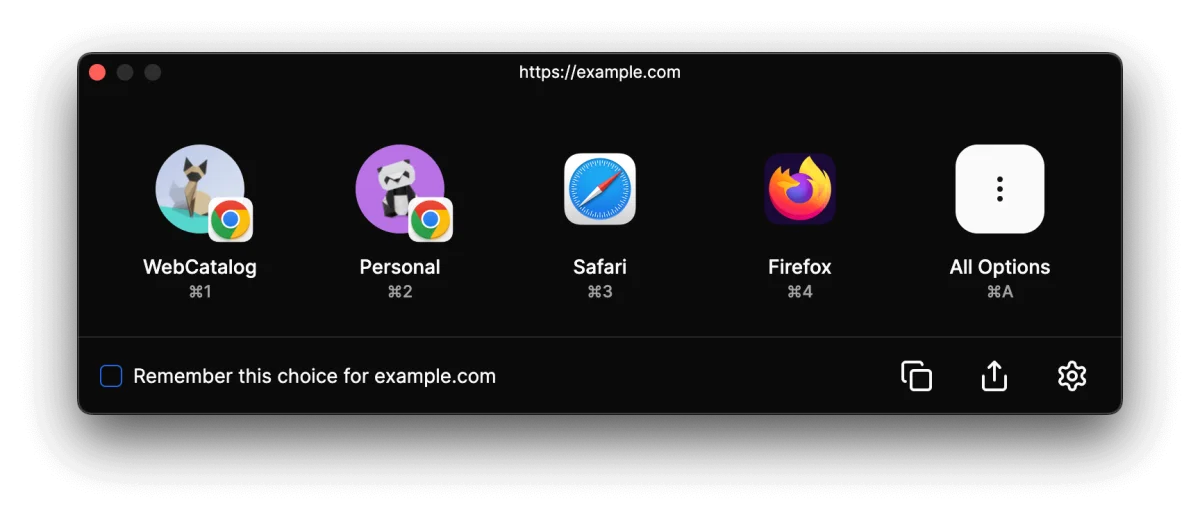
Switchbar lets you choose which browser, browser profile, or email client to use whenever you click a link—on both Mac and Windows.
Also available on macOS.
Features
Total control over where links open
From browser profiles to email clients to smart automation — Switchbar routes every click exactly where it belongs.
Browser picker
Using multiple browsers? Switchbar prompts you to pick your preferred browser each time you click a link. Seamlessly switch between Chrome, Edge, Firefox, and more.
Browser profile picker
Easily choose between multiple profiles when opening links. Works with Chrome, Edge, Firefox, Brave, Vivaldi, and more.
Email client picker
Pick your email app—like Apple Mail, Spark, or Outlook—when clicking on mailto: links. No more unwanted email app launches.
Smart rules
Automate behavior with powerful rules. Want company links to always open in Chrome? Set it once, and Switchbar handles the rest.
Handoff
When the picker opens on your Mac, the link is also offered to your other Apple devices, so you can continue on another Mac, iPhone, or iPad.
URL unshortener
Expands short links like bit.ly and tinyurl.com to their real destination before deciding where they open.
Tracking cleaner
Automatically strip tracking codes from URLs for a cleaner, more private browsing experience.
Deep linking
Open web links directly in desktop apps like Airtable, Figma, Jira, Linear, Notion, Trello, and more—no browser needed.
WebCatalog integration
Switchbar works with WebCatalog apps, so links to sites like Trello open in their desktop app—automatically.
Browser extension
Send any page to Switchbar
Move pages between browsers with a single click. Add Switchbar to your favorite browser for fast switching.
 Google ChromeAdd to browser
 Microsoft EdgeAdd to browser
 OperaAdd to browser
 BraveAdd to browser
 VivaldiAdd to browser
Browser not supported? No problem.
Use our bookmarklet to send pages to Switchbar. Just drag it to your bookmarks bar and you're good to go.
↑ Drag this button to your bookmarks bar
Take control of your links today
Free to use. Available for macOS and Windows.
Also available on macOS.